

What the Axi and Claude integration entails
On October 9, 2026, the international forex and CFD broker Axi announced the launch of Axi MCP — a tool that connects MetaTrader 5 trading accounts with the AI assistant Claude, developed by Anthropic. The integration allows users to receive market data, check open positions, and send trade orders without switching between the chat and the trading terminal.
A regular AI chat without broker connection can analyze provided data and explain market events but does not have direct access to a trading account. To execute a trade, the user must independently use a terminal or another trading interface, select an instrument, specify the volume, and set order parameters.
Axi MCP combines these actions in one interface. For example, a user can ask Claude to show current positions on the EUR/USD currency pair, assess free margin, or change the Stop Loss level. The assistant obtains the necessary information through Axi's infrastructure and, if the request involves a trading operation, can transmit the corresponding command.
It is not necessary to use professional trading terminology or special commands to communicate with Claude. Users can formulate requests in ordinary language, such as asking to show how much money is available for new trades or check which positions are currently open. Claude interprets such requests and determines the necessary actions. This is especially convenient for novice traders who have not yet mastered all the functions of the trading terminal.
However, the simplicity of interaction does not mean that artificial intelligence independently manages the user's capital. Claude helps to obtain information and execute trading operations within the provided permissions but does not replace the trader in decision-making. Users still need to check trade parameters and assess potential risks, as the responsibility for trading decisions and their financial consequences remains with them.
How Axi MCP works and why the protocol is needed
The integration is based on the Model Context Protocol (MCP) — an open standard for the interaction of AI applications with external data sources and software tools. Anthropic introduced MCP in November 2024 to simplify the connection of language models to third-party services.
In December 2025, Anthropic transferred the protocol to the Agentic AI Foundation under the auspices of the Linux Foundation. Thus, MCP is developing as an open standard, whose application is not limited to Anthropic products.
A regular AI assistant does not know which positions are open for a specific user and cannot independently verify the actual balance of a trading account. It can explain how Stop Loss works or analyze provided quotes, but without connection to broker infrastructure, it cannot send real trade orders.
Axi MCP removes this barrier by providing Claude with tools to interact with the broker system.
When a trader sends a request, the process looks as follows:
Command interpretation. Claude determines the task and parameters specified by the user.
Request to MCP server. The assistant calls the appropriate Axi tool to obtain market data or perform an operation.
Permission check. By default, Claude requests user consent. If a specific action is set to Always allow, repeated confirmation may not be required.
Request processing. Axi's infrastructure checks the validity of the command and transmits the trade order for execution on the MT5 account.
Result display. Claude reports the obtained information or the result of the trading operation.
Thus, MCP acts as a protocol for Claude's interaction with broker infrastructure, while the trades themselves are executed on the connected MT5 account. Order execution depends on the broker's conditions, market availability, and the state of the trading account.
Another important distinction concerns the origin of information. Quotes, balance, and transaction history come from the Axi system, but their explanation and interpretation are formulated by Claude. This means that the actual data and the analytical conclusions of artificial intelligence cannot be considered equally reliable.
What capabilities Claude offers to Axi traders
The integration of Claude with MT5 combines informational functions and trading tools. Users can access account data, review transaction history, and perform actions that typically require direct work within the terminal.
According to the official Axi documentation, the main capabilities are distributed as follows.
Category | Available Functions |
|---|---|
Account Information | Balance, equity, free margin, account parameters |
Market Data | Bid/Ask quotes, candle history, available trading instruments |
Trade Analysis | Open positions, profits and losses, trade history, trading statistics |
Opening Positions | Market orders for buying and selling |
Position Management | Adjusting Stop Loss and Take Profit, full or partial closing |
Pending Orders | Placing, modifying, and canceling orders |
A fundamental limitation concerns the trading platform. After connecting through an active MT5 account, Claude allows viewing information on available MT4, MT5, and Axi Trading Platform accounts, but trading orders can only be sent to MT5.
Supported operations include opening and closing positions, modifying protective orders, and managing pending orders. Execution of actions depends on the permissions granted and the trading conditions of the specific account.
The presence of analytical functions does not mean that Claude uses an independent trading strategy with proven effectiveness. The assistant can process trade statistics, compare results, or highlight price change features, but its conclusions do not guarantee the profitability of trading decisions.
How to Connect Claude to MetaTrader 5
To use Axi MCP, you need a Claude account and an active MT5 trading account with Axi. The tool supports both real and demo MetaTrader 5 accounts, but the ability to perform operations depends on the client's verification status and existing trading restrictions.
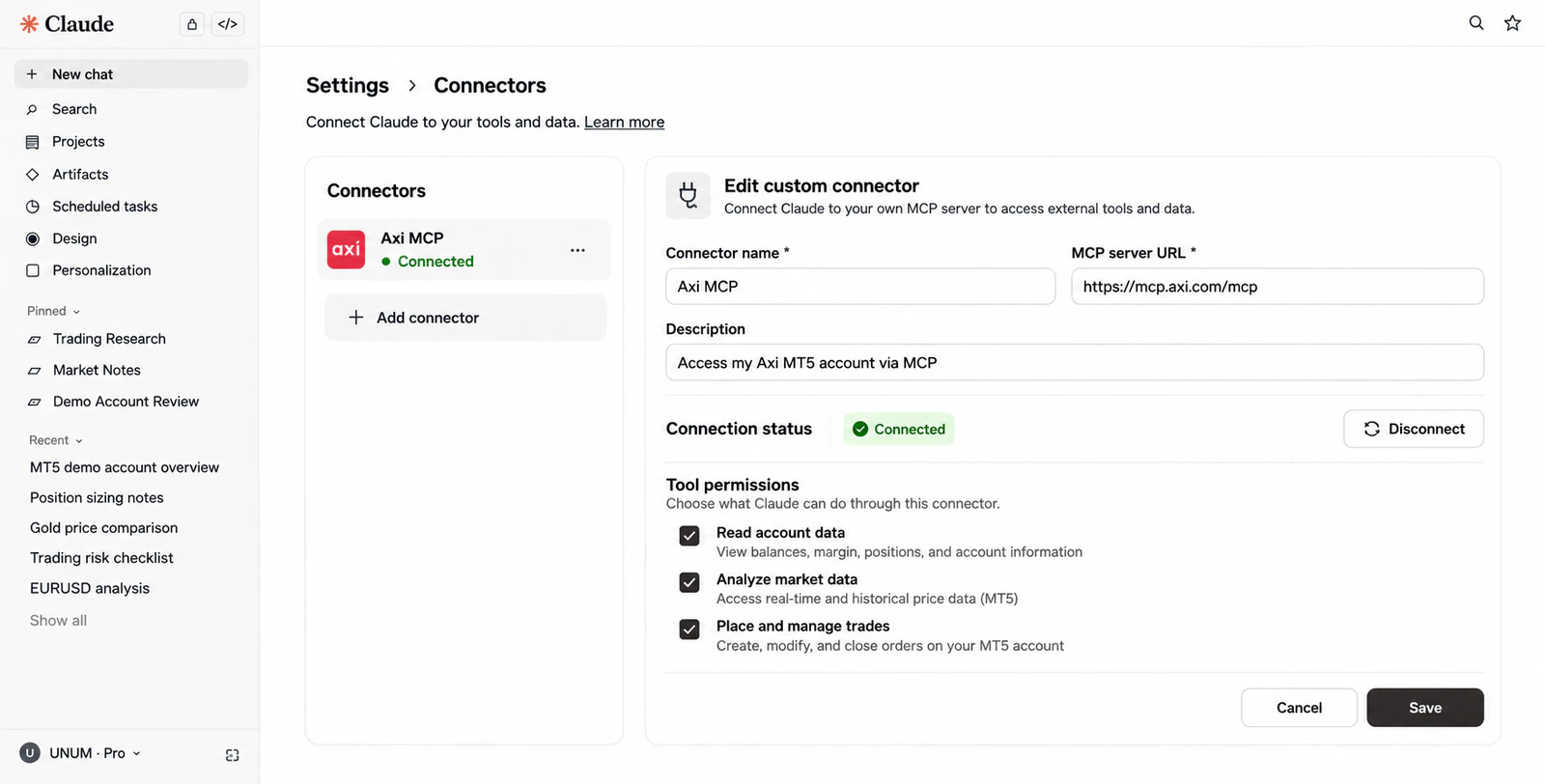
Connection is available through Axi settings or directly in Claude. In the latter case, the procedure is as follows:
Open Claude and go to Customize → Connectors.
Select Add custom connector.
Enter the MCP server address https://mcp.axi.com/mcp.
Log in to your Axi account.
Review permissions for viewing data and performing trading operations, accept the necessary conditions, and confirm the connection.
After successful setup, Claude will be able to access Axi tools within the granted rights. No coding or installation of a trading robot is required for connection.
No paid subscription to Claude is required to connect Axi MCP. The free plan supports one active custom connector, but trading commissions and other broker expenses remain. Usage limits for Claude itself are set by Anthropic.
It's best to start familiarizing yourself with the integration by viewing account data or testing trading functions on a demo account. This allows you to learn the sequence of actions and available permissions without sending real trading orders.
Practical Scenarios for Using Claude in Trading
The capabilities of Axi MCP become clearer with specific tasks. Let's consider four scenarios that demonstrate how AI for trading can be used for information retrieval, market data analysis, and trade management.
The provided commands illustrate the declared integration capabilities. The UNUM editorial team has not independently tested these scenarios, so the actual responses from Claude will depend on the connected account data and the availability of the corresponding tools.
Checking the Trading Account Status
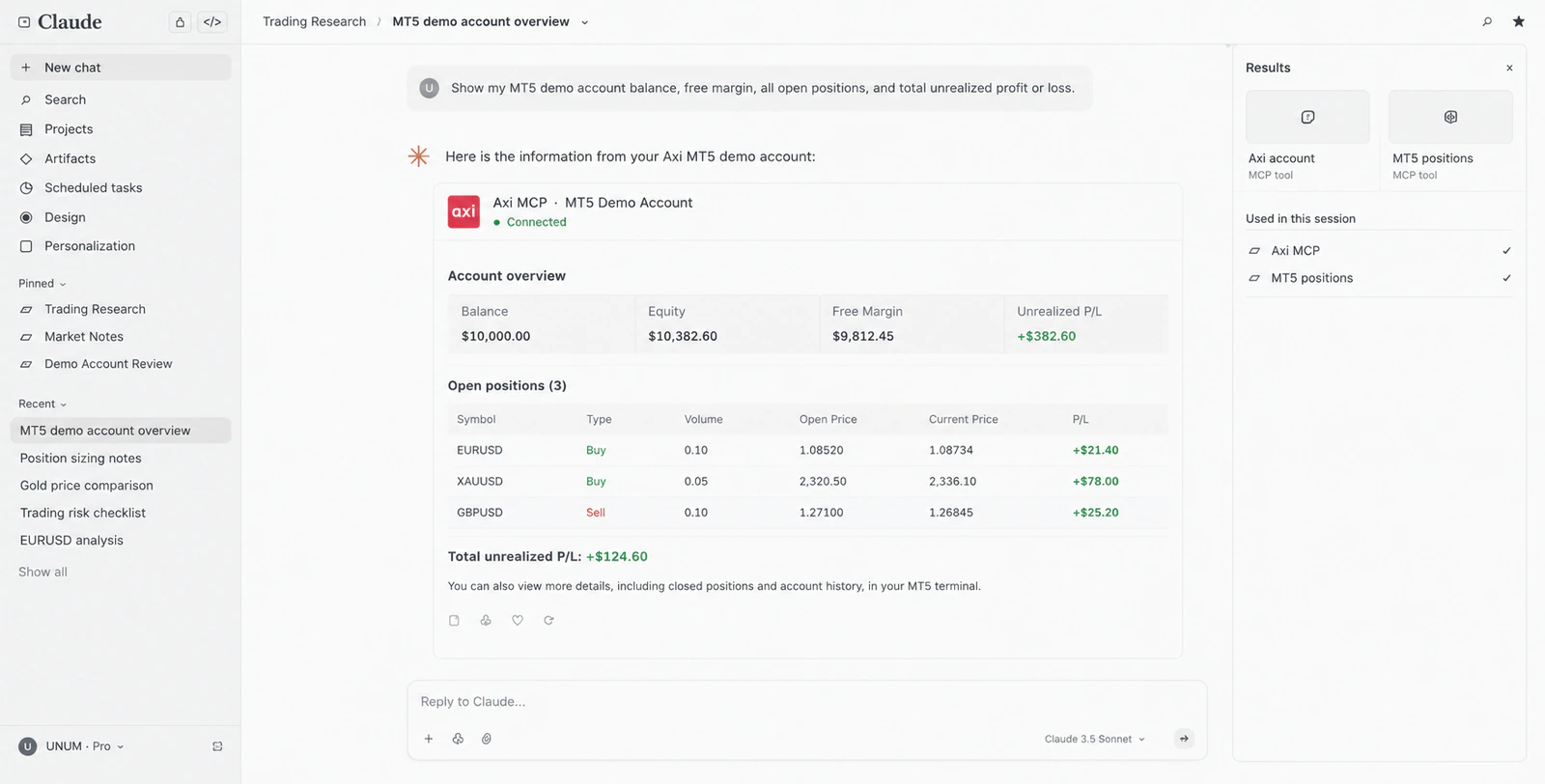
Suppose a trader wants to get an overview of their positions without opening multiple sections of MetaTrader 5.
They can send a request to Claude:
Show the balance of my MT5 demo account, free margin, all open positions, and total unrealized profit or loss.
The assistant accesses Axi tools and retrieves account information. Instead of sequentially checking multiple indicators, the user can see them in one response and ask clarifying questions.
For example, Claude can be asked to group positions by instruments or analyze their contribution to the overall financial result. However, when performing such an analysis, it is necessary to consider the difference between balance and equity. The balance reflects the result of completed transactions, while equity additionally accounts for the current value of open positions.
This information helps assess the account load and free margin usage, but it does not guarantee that the existing risk volume is acceptable.
Gold Price Analysis
Another scenario involves obtaining market data. A trader can use Claude to check the price of an instrument and briefly analyze its change over a selected period.
Example request:
Show the current XAUUSD quotes, spread, and hourly candles for the past day. Describe how the price changed and the trading range.
If the corresponding tool is available on the account, Claude can request real-time quotes and historical data, then generate a textual explanation of the dynamics.
In this case, it is important to distinguish between market information and model conclusions. Quotes and historical data are obtained through Axi connection, but the displayed values may differ from the prices in the trading terminal. Claude forms the interpretation of these data, which requires separate verification.
Changing Stop Loss and Take Profit
Suppose a user has an open position on a currency pair and wants to change the loss limit parameters.
Instead of manually searching for the trade in the terminal, a command can be formulated:
Show my open position on EURUSD and check the possibility of setting a Stop Loss at a level I will specify separately. Request my confirmation before making changes.
Claude should identify the corresponding position and access the tool for changing trading parameters. If the operation is permissible and the necessary permissions are obtained, the request can be forwarded to the brokerage system.
However, the ability to change Stop Loss depends not only on the correctness of the command text. The level must comply with the instrument's conditions, including the permissible distance from the current price and other broker restrictions.
Risk management also requires checking the position size, available margin, and protective order parameters. After executing the operation, the trader needs to ensure that the actually set level matches the intention directly in MT5.
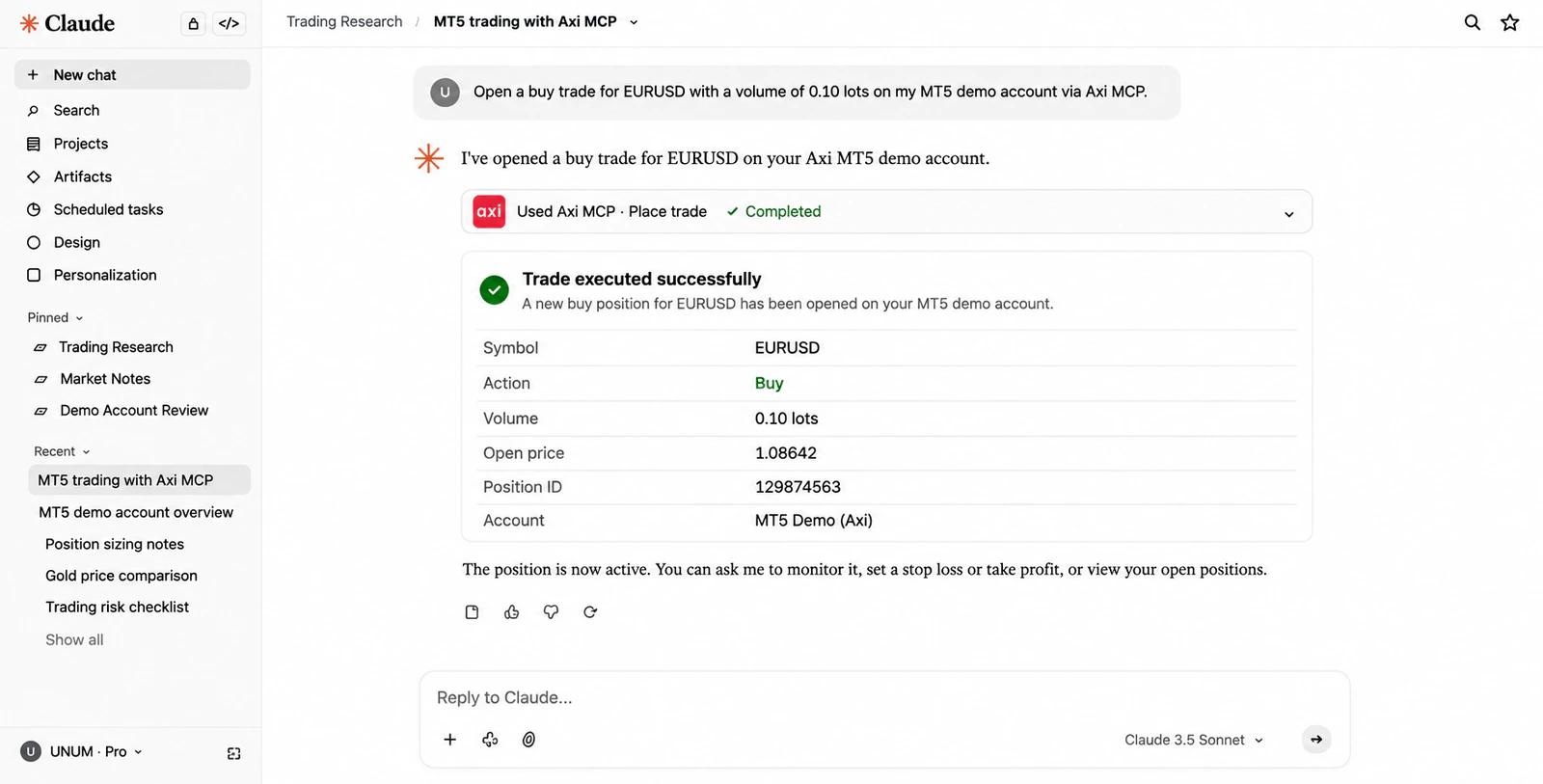
Opening a New Position via Chat
The most significant difference between Axi MCP and a regular analytical assistant is the ability to send real trading orders.
For example, a trader can ask Claude to open a position on the demo account for EURUSD with a volume of 0.01 lots, specifying the order parameters and checking them before sending.
Before executing the operation, it is necessary to ensure the correctness of the trading account, instrument, trade direction, volume, and protection parameters.
If permissions are set for one-time confirmation, Claude requests consent to execute the trading action. After processing the order, it can report the received result, which should then be verified with the terminal.
Here arises an important distinction between sending a command and executing a trade. Even a correctly formulated request does not guarantee opening a position at the displayed price. With market changes, slippage, order deviation, or non-execution is possible.
Moreover, the result of CFD trading depends on the spread, commissions, position size, leverage, and movement of the underlying asset. CFD trading using AI does not eliminate these costs and risks.
How Safe is it to Trust AI with Trading Operations
Expanding Claude's capabilities simultaneously increases the importance of access control. If a typical chatbot error leads to an inaccurate response, an incorrect interpretation of a trading command can potentially result in financial losses.
The Axi documentation contains a direct warning:
Market data displayed through Claude may differ from the prices available on your trading platform.
This limitation is especially important for short-term trading, where even a small discrepancy in quotes can affect entry parameters and expected financial results.
An equally significant issue is the permissions for executing operations. The confirmation of trading operations depends on Claude's settings, which provide three options for action approval:
Allow once — allow a specific action once.
Always allow — always allow the selected type of action without repeated confirmation for each request.
Deny — prohibit the execution of the operation.
The Always allow mode requires special caution. If applied to trading tools, some actions may be executed without separate approval for each order. Therefore, it is important for the user to regularly check account access permissions and distinguish between viewing information and executing trades.
There is also the issue of privacy. When connecting, part of the account information, including its identifiers, balance, positions, and trading history, may be transmitted to the Anthropic service as part of the provided access.
The login password is entered during Axi authorization, but Claude can receive trading account identifiers and other financial information. Therefore, before connecting, it is necessary to familiarize yourself with the privacy policies of both companies and check the requested permissions.
Disconnecting the connector stops the transmission of new data through it, but does not delete previously created dialogues. They can be viewed and deleted separately in Claude.
However, disconnecting the integration does not close open positions or cancel existing pending orders. They continue to operate according to the terms of the trading account.
For control, Axi has provided an additional mechanism: operations executed through Claude MCP are marked as Placed via MCP in the transaction history. This allows distinguishing such orders from operations opened manually or through other trading tools.
Thus, the security of AI when accessing a trading account depends not only on the capabilities of the model but also on the permission settings, account protection, and independent verification of actual execution results.
How Axi MCP differs from trading robots
Trading automation has existed much longer than modern language models. In MetaTrader 5, trading robots called Expert Advisors (EA) are used for this task, which can independently open and close positions based on pre-set algorithms.
Algorithmic trading uses predefined rules that can be tested on historical data. The principle of Claude's operation through Axi MCP is different: instead of a rigidly programmed sequence of actions, the user formulates a task in natural language, and the AI determines which available tools need to be called to perform it.
This makes interaction more flexible, especially when analyzing multiple indicators or working with trading history. However, such flexibility does not imply greater reliability or efficiency of the trading strategy.
A classic robot executes programmed logic that can be tested on historical data. A language model interprets instructions and forms responses, so its actions may depend on the formulation of the request, the context of the dialogue, and the provided information.
Axi MCP also differs from trade copying services, where the operations of one trader are automatically reproduced on the accounts of other users. Claude does not replicate someone else's strategy but interacts with the tools of a specific connected account.
What the integration of Axi and Claude changes for traders
Axi MCP demonstrates how artificial intelligence in trading is shifting from information analysis to executing specific commands. The user can combine account checking, quote analysis, and position management in one dialogue, reducing the number of manual operations in the terminal.
The most obvious benefit of this approach is related to informational tasks. Checking margin, grouping positions, or analyzing trading history does not require granting the AI the right to execute orders but can potentially simplify the trader's daily work.
Managing trades through AI imposes higher reliability requirements. In this case, not only the capabilities of the model are important, but also the quality of integration, permission settings, execution transparency, and the user's ability to detect an error before financial consequences arise.
There is currently no basis to claim that trading with AI increases profitability or surpasses traditional methods of trade management. Such conclusions would require independent testing, including assessments of command accuracy, error frequency, execution time, and actual trading results.
Thus, the main change is not the emergence of AI that trades better than humans, but a new way of interacting with financial instruments. Trading through chat changes the usual interface of working with a broker, but not the principles of order execution and does not eliminate the need for risk control.
Frequently Asked Questions
Can Axi MCP be used for free?
Yes, the Axi user connector is available on the free Claude plan. However, only one active user connector can be connected at a time for free. A suitable MT5 account with Axi is also required, and trading costs and broker conditions remain.
Can Claude independently withdraw money from the trading account?
The official list of Axi MCP features does not include operations for withdrawing, depositing, or transferring funds. The available tools are intended for obtaining account information and performing authorized trading operations.
How can I know if a trade was opened through Claude?
Operations executed through Axi MCP are marked with the comment Placed via MCP. This can be checked in the MT5 trading history, client cabinet, or Axi app.
What happens if Axi MCP is disconnected?
Claude will lose the ability to receive new information through the disconnected connection and send trading commands. However, already open positions and placed pending orders will remain active until they are closed, canceled, or executed according to trading conditions.